Tuesday, June 26, 2012

The Six Content Categories for the Holy Grail of E-Textbook Publishing

In my previous blog I talked about the holy grail of e-textbook publishing and why we need to create content not as a single unit that flows from a topic introduction through to a summary but as non-linear, compartmentalized chunks of related content. We're not doing that now, but we need to start soon.

Our ability to create content as non-linear chunks and then to present them to the user in a truly useful electronic environment depends on the ability to identify one type of content from another. In essence, we need to be able to categorize types of content differently than we're doing now.

Here's a list of the six key content categories I envision being used for health care e-textbooks, presented here in no particular order save the last, the most important content category of all.

#1: Process

Process content would consist of steps in a procedure, routine, or sequence, as well as key supportive text. We create a lot of process content in health care textbooks, particularly in such topics as:
  • Medical coding and billing
  • Assessment
  • Clinical procedures (hand washing, transferring a patient, performing lavage, and many others)
  • Administrative procedures

#2: Reference

Reference content would consist of items that support the main textual content, including:
  • Charts
  • Graphs
  • Diagrams
  • External links
  • Definitions

#3: Pedagogical

Any activity or learning exercise to be completed by the student would fall into this category. In addition, heuristic information, such as learning objectives evaluative outcomes, would also fall into the pedagogical category. Pedagogical content would therefore include:

  • Multiple-choice, true-false, short answer, or any other type of test item
  • Learning or behavioral objectives
  • Learning outcomes
  • Relevant standards or competencies for accrediting organizations

#4: Supportive

Sidebar-type content that supports the main text but is secondary to it would be considered supportive text, including:
  • Thematic sidebars, which typically make use of a special icon and cover the same topic, such as legal issues, patient education, safety tips, alerts, and so forth
  • Non-thematic sidebars, which typically consist of stand-alone boxes of content
  • Case studies or scenario-type situations

#5: Administrative

This category would consist of content that provides functionality support, navigational support, and other kinds of content that carry no clinical information. This includes:

  • Navigational links
  • Directions for functionality
  • Help content for site

#6: Core

While all of the other types of content would allow students to wander through the e-text pretty much as they wish, core content would consist of the most important content every student must view and use. Core content would require special functionality that forced, in a way, students down a particular path of inquiry.

This kind of content might prove most difficult to develop because it requires authors to identify the most fundamental concepts for any particular topic area. It's critical, though, that those concepts be not only identified but also developed in such a way as to allow for focused learning.

To identify and develop this content, authors should look at what in a printed book would be, of all places, the summary.


Certainly the six content types outlined here are just the beginning. They need to be discussed, dissected, added to, and amended as needed.

My goal here is to present a foundation for moving forward into the next and essential level of e-textbook development. I hope it's at least a small start in that direction.

Wednesday, June 20, 2012

The Holy Grail of E-Textbook Publishing

Every time I turn around, it seems, we in educational publishing are discussing the impact of e-textbooks and how they're perceived by the market. We talk about how to sell them, package them, promote them.

But we're talking about the cart before we've figured out how to move the horse. To move the horse we need to completely rethink how we develop textbooks and, most specifically, how we generate content in the first place.

Retrofitting content

Right now, textbook publishers are generally taking already-developed content and merging it with whatever electronic content we can find. Basically, we're retrofitting printed content into an electronic format.

Oh, sure, we try to make all that content pretty and "intuitive," but we're retrofitting it nonetheless. Right now, I think that's pretty much all we can do.

Eventually, though, and I hope sooner rather than later, we need to start developing content specifically and only for electronic delivery. No easy task.

Deconstructing content

To create truly useful electronic content we need to completely deconstruct the way we write books, and then build out with an entirely new approach, one that starts with a summary and then branches from there.

Let me explain.

When you sit down to write a chapter in a textbook, you start with a global concept and then start breaking down that concept into its many disparate pieces. Let's call these pieces of content chunks.

The process works perfectly for print, with the reader delving deeper and deeper into the chunks and each subsequent concept opening itself to discovery. Then, at the end of each chapter, we summarize what was discussed, highlighting each key concept.

We've been trying to do the same thing with e-books, and we've been failing miserably.

Students find retrofitted e-books disjointed and incomplete. They find it hard to follow the flow, and it's little wonder. We can't expect a student to follow a flow of information that has been lifted from a textbook and force-fed into a pretty software shell.

No, we need to write the content specifically for that delivery, and that's one tall order.

Creating content

To create a truly useful e-textbook, we need authors who can write about complex and comprehensive topics in ways that go against pretty much everything they know about writing.

Logical flow from one concept to the next? Not so much.

Gradual building of concepts one on the other? Nah.

Overall organization from head-to-toe, inside-to-outside, normal-to-pathological? Ho-hum.

What we need to create instead are non-linear, compartmentalized, almost blog-like chunks of content that can be manipulated in a variety of ways by the learner. Here's how it would work:
  • For linear learners, we would present the content electronically in a mostly linear way, much like a book, with links and other "off-shoot" functionality for related content always at hand.
  • For visual learners, we would present the content in a highly visual way, perhaps using concept maps that allow the learner to navigate through the area based on what they'd like to learn, when, and how.
  • For auditory learners, we would provide key concepts in audible and written format and allow them to navigate through the content through audible cues.
In short, we need to create content in such a way that it can be used by the end user  — the learner  — anyway they want it while still providing an effective learning environment. We just can't do that by retrofitting content from a printed textbook. It will take more, something new, and something revolutionary.

I think this new process is the holy grail of textbook publishing, and I for one can't wait for it to evolve.

Thursday, June 7, 2012

Five Rights of Publishing

You've probably heard of the Five Rights of Medication Administration (actually there are six). No doubt you've also heard of the Five Rights of the First Amendment.

Well, anyone who writes a book or who is thinking about writing a book should become familiar with what I call the Five Rights of Publishing.

Every publisher considers these five rights when deciding what books to publish. They're that critical. You should consider them too to help ensure your success as an author.

Let's take them one at a time, looking at the questions you should ask yourself about your project.

#1 — Right Book

Is this the right book? Does its approach hit the mark? Is it organized appropriately?

#2 — Right Author

Am I the best person to write this book? If I'm working with other authors, is the team the best one to write the book? Do I have the requisite knowledge, experience, and background to write authoritatively about the topic?

#3 — Right Time

Is this the right time to publish this book? Is there a current need for this book, or is it a future need? If it's a future need, will the book be publishing in time to meet it, or will it be too far ahead of the curve?

#4 — Right Market

Is there a clear market for the book? Can I define the kinds of programs or individuals most likely to purchase the book? If the answer is that everyone will want this book, think again. Think about all the books in every bookstore you've ever been in and why you didn't gravitate to every single section in the store. Then apply that thinking to your own book.

#5 — Right Format

Should the book be hardcover? Softcover? Spiral-bound? Should it be 8-1/2 x 11 or 7 x 10 or 6 x 9? Should the interior be one-color? Two-color? Full-color?

When you think about all of these rights will you be able to ensure the successful outcome of all your writing endeavors?

You got that right!

Monday, May 21, 2012

3 Keys to Making Images "Work"

I learned my editing trade first at Weekly Reader and then at Springhouse Corp, now part of a conglomerate that shall not be named. The editors at those places drilled it into me: Make images do work.


An image does work when it provides clinical content in a visual way. An image of an ECG strip, the interior of a heart, or an algorithm of emergency care of ventricular fibrillation do real clinical work.

An image of someone at a computer doesn't do any clinical work. Who hasn't seen someone at a computer?

An image of an apple in an article about nutrition doesn't do any work. It's just there to look pretty on the page.

I hate those kinds of images, and I blame, specifically, Nancy Webb at Weekly Reader and Pat Schull at Springhouse. I love them both; they're incredible editors and incredible people, and they made me this way.

So blame them.

Ask yourself these three questions to make sure the images that accompany your articles or chapters do good work.

#1 Does the image help illustrate a concept?

For every image you want to add, ask yourself, Does it move the content forward?

Let's say you're authoring a chapter on medical assistants using an electronic medical record (EMR). Does a stock photo above of a smiling woman at a laptop, like the one above, do anything to move clinical meaning forward?

No, it doesn't. So don't use it.

But if you used a photo like the one at right, now you've got something. Now you've moved the clinical meaning forward.

See the difference?

#2 Does the image carry the content forward?

Let's go back to that apple in a nutrition article. By itself, the apple image doesn't do squat. It just sits there.

Seriously, who hasn't seen an apple?

Right. So for that article, which describes, let's say, how fact sheets about common fruits can help people better understand nutritional requirements, suppose you used an image like the one at right? Now you've got something worthwhile.

#3 Is the image useful enough to take up valuable space on the page?

Your publisher pays dearly for every inch of space on the page. Do your part to make sure you're using it wisely.

http://www.cardiorenew.com/october2009.php
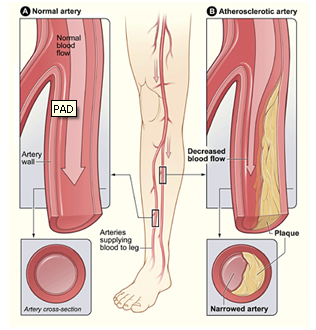
Images that do more than one piece of work always prove valuable. For instance, an illustration that shows blood flow through a partially blocked artery can show (1) narrowing of the arterial lumen, (2) decreased blood flow at the blockage, and (3) how a blockage can lead to disease.

If you aim to make most of your images perform that much work, you'll strengthen your textual content and give the visual reader great help in understanding the concepts.

So stay away from stupid, do-nothing images and make your images do real, honest to goodness work.

Nancy and Pat would be proud.

Friday, May 4, 2012

So This is What 60+ Looks Like?

I've been over 60 now for a little over a year and a half, and I've finally reached the point where I understand what my good friend Phil Carr once told me.

"Sixty is different," he said, a certain sadness and touch of fear in his eyes. "It's different."

I thought, Phil, hey, 60 is just another number. I was fine when I hit 50, no big deal. How tough can 60 be?

Pretty tough, as it turns out.

I've thought more about my own mortality since I turned 60 than at any other time of my life. I mean really thought about it.

  • Am I ready to die if I go sooner rather than later?
  • No, I'm really not ready.
  • I guess I could be ready.
  • Hell, no, I ain't ready!
  • How do I get ready?
  • What is ready?
  • Maybe I'm ready, I don't know.
  • How is anyone ever ready?

I've entered the mortality years, doing more looking back than looking ahead.

I've entered the been there, time to let someone else do that years.

I've entered the what's next years, the time when I'm not yet ready to retire but am thinking solidly and clearly about what I want to do with my remaining time.

Is it too late to be a David McCullough wannabe? I hope not.

It's certainly too late to get much better at golf, though I do think pushing my handicap down into the high teens is possible.

I just want have enough time, just enough.

Enough to have some fun without having to have to work.

Just enough time, that's all.

Phil, my friend, now I understand. The 60s really are different. Mortality different.

I don't know what the rest of the 60s will bring, or God willing the 70s and beyond, but I'd like to find out.

I would very much like to find out.

Thursday, May 3, 2012

Where Social Media and Public Schools Meet

The New York City Department of Education (NYC DOE) has drawn an interesting line in the sand with social media. The department released a set of social media guidelines this week that lay out a line faculty, staff, and students can't cross.

There are two fundamental guidelines:
  1. Teachers can have their personal Facebook, Google+, Twitter, or other social media pages, but they can't interact on those sites with students. They call this use "Personal Social Media."
  2. Teachers can interact with students using social media but must do so through the Department's own sites. They term this "Professional Social Media."
The guidelines also require that DOE employees behave professionally regardless of whether they're using personal or professional social media.

On face value, I like the core message about remaining professional regardless of what social media you're using. Yes, teachers should do whatever they can to keep their professional life separate from their personal life, if only because their students need their own space too.

But the guidelines fall short in addressing student-to-teacher interaction. What if a student follows his teacher's Twitter feed? Can the teacher be disciplined?

I also fear the effects of making faculty go through their institution's social media managers whenever they want to use the media for their classes. Kinda goes against the whole premise of social media. And education, for that matter.

I think schools need to grab social media by the horns, not shirk from it, which is what the NYC DOE's guidelines are trying to do. They're trying to walk a fence between embracing social media and ignoring it, and when you're walkin' a fence, you're bound to fall off.